The Schedule App Built for the Front Line
Track maintenance schedules across your entire fleet from a single register. Service intervals count down automatically as equipment runs, so critical maintenance never gets missed.

Trusted by companies, projects and teams of all sizes















Why Schedule management Is Harder than It Should Be

Spreadsheets miss critical services
Fleet managers track maintenance across multiple spreadsheets and paper logs, leading to missed service intervals and unexpected equipment breakdowns.

No visibility across fleet operations
Checking what’s due means opening different systems and files, making it impossible to see fleet-wide maintenance status at a glance.
Compliance audits become file hunts
Proving maintenance compliance means hunting through scattered files and folders across different locations and systems.

Equipment fails unexpectedly
Without proactive scheduling based on actual usage, critical equipment breaks down during peak operations, causing costly downtime.
A Smarter Schedule App

Automated service interval tracking
Service intervals count down automatically based on operating hours, mileage, or calendar time as equipment runs, triggering alerts before services are due.

Single maintenance register
Fleet managers see what services are due across the entire operation from one register, eliminating the need to check multiple systems.

Complete audit trail
Every service event links back to asset history, creating audit-ready compliance records without hunting through scattered files.

Equipment fails unexpectedly
Schedule work based on actual usage patterns and manufacturer specifications, keeping assets in service longer with preventive maintenance.


Understanding Schedule Software
Understanding fleet maintenance scheduling
Fleet maintenance scheduling moves beyond calendar-based reminders to track actual equipment usage and operating conditions. Modern maintenance programs use operating hours, mileage, cycles, or custom usage units to determine when services are actually needed, preventing both over-maintenance and unexpected failures. The challenge for fleet managers is tracking these different interval types across diverse equipment while maintaining visibility into what's due across the entire operation. Manual tracking methods break down as fleet size grows and equipment types diversify.
Key components of effective maintenance scheduling:
- Operating hour tracking with automatic countdown
- Multiple interval types (calendar, usage, condition-based)
- Fleet-wide visibility and prioritization
- Integration with work order systems
- Complete service history and compliance records
- Predictive scheduling based on usage patterns
The impact of proactive maintenance scheduling
Equipment maintained on proper schedules stays in service 25-40% longer and experiences fewer unexpected failures. Fleet managers can plan maintenance windows during scheduled downtime rather than responding to emergency breakdowns. Proper maintenance records also protect warranty coverage and demonstrate compliance during safety audits.
How To Set Up a Digital Schedule Using Sitemate
Step 1:
Step 2:
Import existing fleet data. Bring in current asset information, operating hours, and service history from spreadsheets or existing maintenance systems.
Step 3:
Set up automatic tracking. Configure how operating hours and usage data feeds into the system, whether through manual entry, telematics, or equipment monitoring systems.
Step 4:
Train fleet managers. Show fleet managers how to review upcoming services, schedule maintenance work, and sign off on completed services in the maintenance register.
Step 5:
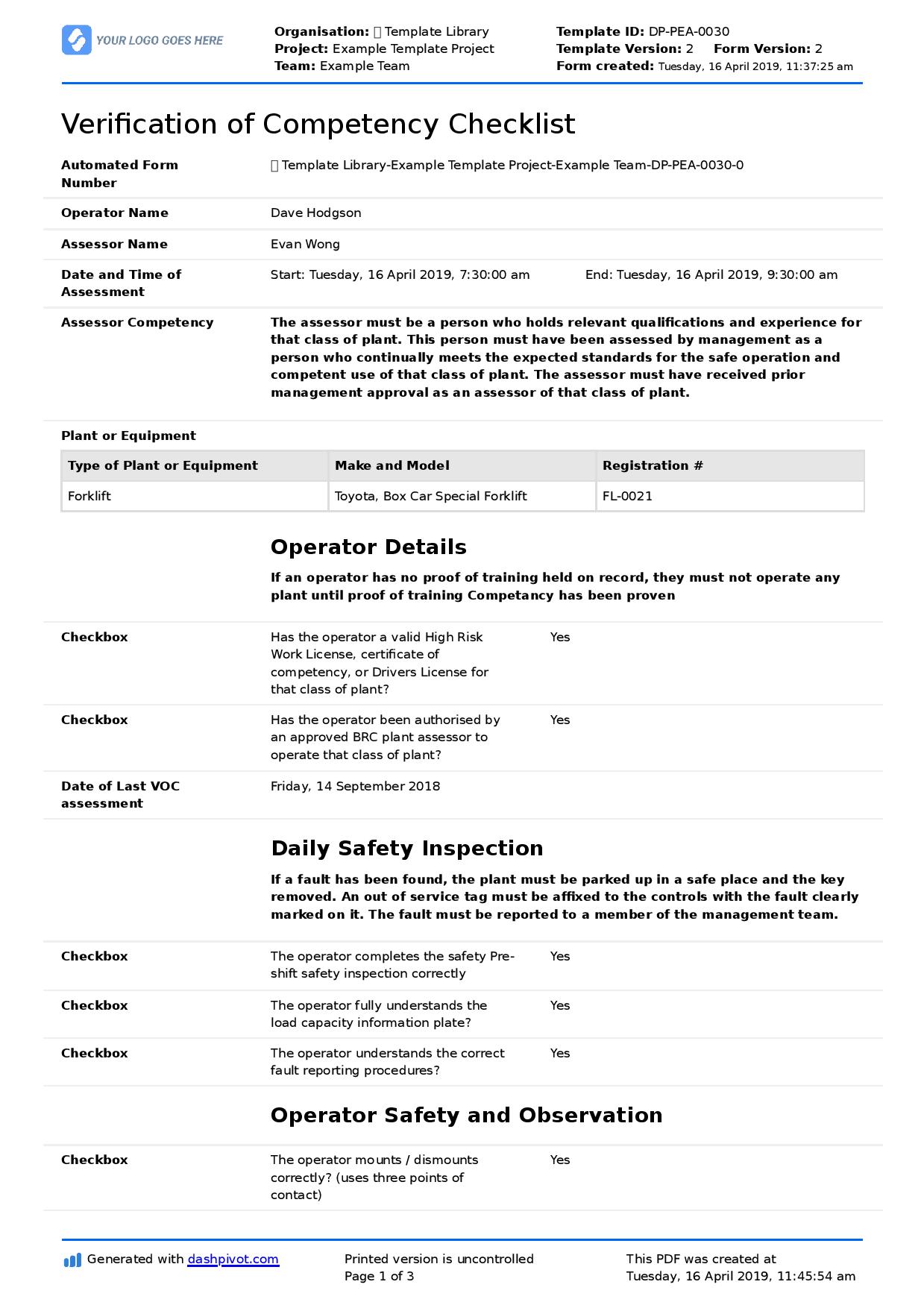
Start Faster With Built-In Schedule Templates


See How Sitemate Has Already Helped Companies Like Yours

"Instead of spending 5 days on data entry, it's now just ad hoc time checking the data coming in electronically."
- Rhys Thomas, CFO
95% time saved
On manual HR data entry tasks
0 lost forms
Thanks to digital submission
Mobile maintenance scheduling
Field teams access maintenance schedules and update operating hours directly from equipment locations, keeping service intervals accurate and maintenance records current.
Comparison: Paper Schedule vs Digital Schedule
Most project teams already know paper and spreadsheets aren't cutting it. Here's what changes when you move your method statements to a digital system.
Automatic Service Interval Tracking
Fleet-wide Maintenance Visibility
Usage-based Scheduling
Audit Trail
Actions and Follow-ups
Reporting
Searchability
Permissions
Compliance Evidence

Paper
Frequently asked questions about Schedule
What if the AI gets the service intervals wrong?

AI calculates intervals from manufacturer specifications and your actual usage data. Fleet managers review and approve every service before it’s scheduled, maintaining full control over maintenance decisions.
How does the system track operating hours for different equipment types?
Operating hours can be updated manually, imported from telematics systems, or entered by field teams using mobile devices. The system accommodates different tracking methods based on your equipment and operational needs.
Can we set up custom maintenance intervals beyond standard schedules?
Yes, create custom usage units and intervals specific to your operations. Track maintenance based on cycles, production units, environmental conditions, or any usage metric relevant to your equipment.
How does maintenance scheduling integrate with work orders?
Scheduled maintenance automatically generates work orders with all relevant asset information and service requirements. Completed work orders update the maintenance register and reset service intervals.
What happens if we miss a scheduled service?
Overdue services are flagged in the maintenance register with escalating alerts. The system maintains a complete record of missed services for compliance tracking and helps rank catch-up maintenance.
How are maintenance records structured for compliance audits?
Every service links directly to the asset record with timestamps, technician signatures, and supporting documentation. Compliance reports can be generated instantly for any time period or asset group.
Can field teams update maintenance schedules from job sites?
Field teams using Flowsite can update operating hours, complete service checklists, and mark services complete directly from equipment locations, keeping maintenance schedules current and accurate.
 English (United States)
  English (Australia)
  English (UK)
  English (New Zealand)
  English (South Africa)
  German