
The Docket App Built for Construction Teams
Daily dockets get completed automatically from crew check-ins, material logs, and progress photos throughout the shift. Supervisors review and sign off before leaving site — no more end-of-day paperwork rush.

Trusted by companies, projects and teams of all sizes















Why Docket management Is Harder than It Should Be

End-of-shift paperwork rush
Foremen scramble to complete daily dockets after long shifts, rushing through crew hours and material records when they want to head home.

Handwritten errors and disputes
Paper dockets with illegible writing or missing details lead to payroll disputes and arguments over hours worked.

Missing labour cost visibility
Project managers don’t see actual labour costs until dockets are processed, making it impossible to track budget performance in real-time.

Incomplete material records
Materials used throughout the day get forgotten or estimated incorrectly when recorded hours later, affecting job costing accuracy.
A Smarter Way to Manage Docket

Automatic docket generation
Daily dockets populate automatically from crew check-ins, timestamped material logs, and progress records captured during the shift.

Voice-to-form AI completion
Supervisors record work details by voice — hours worked, materials used, tasks completed — and AI fills the correct docket fields instantly.

Real-time labour cost tracking
Project managers see live labour costs and crew hours across all jobs as dockets get approved, not days later.

Incomplete material records
All crew hours link to GPS-stamped check-ins and timestamped material logs, creating verifiable records that eliminate payroll disputes.
How AI handles daily dockets
AI extracts work details from supervisor voice recordings and maps them to the correct docket fields. **Supervisors review all hours, materials, and progress entries before signing off** — no docket gets submitted without approval.
 Storm
Storm
Use the photos and voice clip to fill out the Docket for me
Voice recording capture
Supervisor records work details via voice throughout the shift or at day’s end: ‘8 hours site prep, 3 cubic metres of concrete poured, 2 labourers and 1 excavator operator.’ Progress photos get uploaded with location stamps.

AI field extraction
AI extracts specific data points from voice recordings: hours by trade classification, materials consumed with quantities, equipment used with operating hours, and task descriptions with completion status.

Automatic form population
Extracted data populates the daily docket template: work completed sections, hours by trade, materials consumed, equipment used, and cost items. Crew check-in data fills labour hours automatically.

Supervisor review and approval
Supervisor reviews the completed docket for accuracy: verifies crew hours against actual attendance, confirms material quantities used, and checks work progress descriptions. Once approved, the docket locks and feeds payroll systems with verified data.
How AI Helps With Docket
Complete daily docket workflow from crew check-in to payroll integration
- Crew check-ins with GPS verification and automatic docket generation from captured shift data
- Voice-to-form AI helps supervisors complete work descriptions and verify entries before approval
- Real-time labour cost visibility and progress tracking across multiple projects via dashboards
- Direct payroll system integration eliminates manual data entry and ensures accurate wage calculations
- Material logging throughout shifts creates comprehensive records for project documentation
Understanding Docket Software
What are daily dockets in construction?
Daily dockets (also called timesheet dockets or job dockets) are mandatory records that capture crew hours worked, materials consumed, equipment used, and work progress for each shift. They form the basis for payroll calculations, project cost tracking, and client billing on time-and-materials jobs. Traditionally completed on paper at the end of each shift, dockets require foremen to recall details from throughout the day — leading to errors, omissions, and disputes when workers disagree with recorded hours or supervisors can't remember exact material quantities used.
Key elements of accurate daily dockets:
- Crew attendance with start/finish times by trade
- Materials consumed with quantities and delivery dockets
- Equipment hours including plant and small tools
- Work completed with location and progress descriptions
- Weather conditions and site delays
- Supervisor signature and approval timestamp
Why docket accuracy matters for project success
Inaccurate dockets create cascading problems: payroll disputes damage crew morale, incorrect material records skew job costing, and missing progress details make it impossible to track schedule performance. Project managers need daily labour cost visibility to make informed decisions about resource allocation and budget management.
How To Set Up a Digital Docket Using Sitemate
Step 1:
Step 2:
Deploy crew check-in system. Install crew check-in stations or mobile apps on site. Configure GPS boundaries for automatic location verification and set up material logging workflows for common consumables.
Step 3:
Train supervisors on voice completion. Show foremen how to use voice-to-form AI for completing work descriptions and material records. Practice the review process for verifying auto-populated docket entries.
Step 4:
Integrate with payroll systems. Connect approved dockets to your existing payroll software. Test data flow from docket approval through to wage calculations and ensure crew hour classifications match payroll codes.
Step 5:
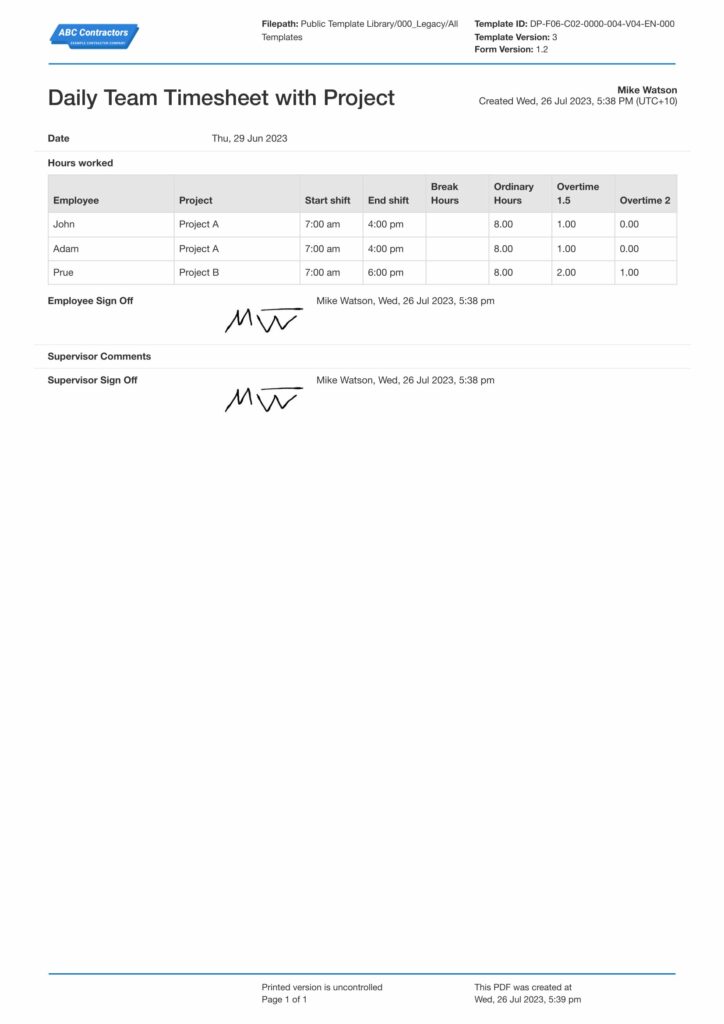
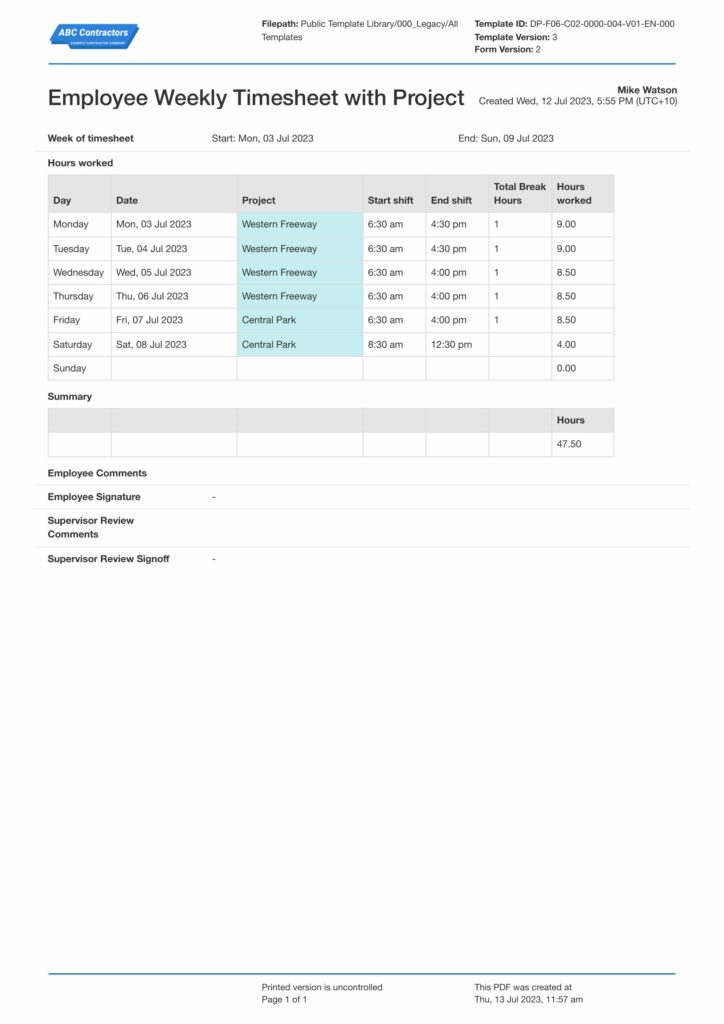
Start Faster With Built-In Docket Templates

See How Sitemate Has Already Helped Companies Like Yours

"People can access the system remotely. There's no need to sign a form in person."
- Stuart Gordon, Group Health and Safety Director
6 live regions
Managing housing projects with Dashpivot
100+ forms
Use digitally across health, safety, and quality
Project-wide docket dashboard
Flowsite aggregates daily docket data across all jobs, showing real-time labour costs, crew productivity, and material consumption trends to help project managers optimize resource allocation.
Comparison: Paper Docket vs Digital Docket
Most project teams already know paper and spreadsheets aren't cutting it. Here's what changes when you move your method statements to a digital system.
Automatic crew hour capture
Voice-to-form completion
GPS-verified attendance
Real-time cost visibility
Audit trail
Supervisor approval workflow
Offline access
Reporting and analytics
Searchable records

Paper
Frequently asked questions about Docket
What if crews forget to check in?

Supervisors can manually add hours during the docket review process. The system reminds crews to sign in but doesn’t block manual corrections when needed.
How accurate is the voice-to-form AI?
AI extracts work details with high accuracy, but supervisors always review and can edit any field before approving. The system learns from corrections to improve future accuracy.
Can dockets be edited after supervisor approval?
Approved dockets lock automatically to maintain payroll integrity. Any changes require supervisor re-approval and create an audit trail of modifications.
What happens if GPS check-in fails?
Crews can still check in manually with a note about the GPS issue. Supervisors verify the attendance during docket review and can approve the manual entry.
How do dockets integrate with our payroll system?
Approved dockets export crew hours by trade classification directly to your existing payroll software, eliminating manual data entry and reducing processing time.
Can we tailor docket templates for different job types?
Yes, you can create multiple docket templates with different material categories, trade classifications, and approval workflows to match various project requirements.
What if the supervisor needs to add details not captured during the shift?
Supervisors can add notes, adjust material quantities, or include additional work descriptions during the review process before approving the final docket.
 English (United States)
  English (Australia)
  English (UK)
  English (New Zealand)
  English (South Africa)
  German