Built for enterprises

that run on the front line

The fleet and asset platform for the built world. From hand tools to heavy machinery, in one register.

Certifications & Standards

Built to the standards your security team already audits against

Full stack fleet and asset management for the built world. Mobile-first, QR-driven, every stage in one system.

GDPR Compliant

Personal data handled to EU GDPR requirements, including data subject rights and breach notification.

AWS Global cloud infrastructure

Built on AWS Platform-as-a-Service, with geographic data residency in the region of your choice.

SOC-2 Type II certified

Independently audited every year against the SOC-2 trust principles.

NIST CSF Aligned

Risk-based cybersecurity program mapped to the NIST framework: identify, protect, detect, respond, recover.

Roll out AI to the front line without losing control

Your team is already running AI through consumer tools. The risk is not slow adoption, it is ungoverned adoption. Storm, the Sitemate AI agent, is built so security, compliance, and operations teams can deploy AI deliberately.

What admins control

Which workspaces, templates, and fields Storm can write to

Configured at the workspace, template, and field level

Which fields are locked to human-only entry

Safety-critical fields can be excluded from AI writes

Which LLM runs in which context

Different risk profiles, different models, configured per workflow

Which workflows have Storm enabled at all

Switch on per use case, not all-or-nothing

What is always true

Storm never commits a record on its own

Every output is a draft for human review

A qualified person approves every record

No AI-only sign-off, ever

Every input, draft, edit, and approval is logged

Traceable owner against every action

AI-generated records hold up under audit

Treated identically to human-entered records in the audit trail

Governance & Audit

An audit trail that holds up

Sitemate gives administrators and auditors a complete view of who did what, when, and on which record. Records hold up under audit, litigation, and regulator review.

Every form, template, and record change

Who entered what, what was auto-populated, who approved, and when

Every access change

Invites, role changes, removals, auto-logouts

Every approval signature

Right reviewer enforced at each stage, by user type or permission

Every system event

Logs shipped to AWS Security Hub, CloudWatch, and Datadog

Activity Feed

    Customer Stories

    How enterprise teams run Sitemate

    "The ease of the operation will make people want to be compliant."

    Stuart Gordon — Group Health and Safety Director

    6 regions

    Live housing projects on Dashpivot

    Live dashboards

    Real-time data to boards & clients

    "Our process now is so much quicker, easier, and more efficient. It's improved tenfold."

    Shane Russo — Site Manager

    6 regions

    Same pre-starts across every region

    1,000+ employees

    Same-day reporting across remote sites

    Your business deserves the best

    4.6 400+ ratings 4.7 800+ ratings 4.8 4.7

    Sign In & Access

    SSO for your team. Frictionless access for everyone else

    SSO and MFA for your team. Lighter sign-in options for partners and subcontractors, so IT doesn't have to manage accounts for every contractor on site.

    Contributors:

    your team

    SSO via SAML 2.0 or OpenID Connect (OIDC)

    Works with Microsoft Entra ID, Okta, and any compliant identity provider. MFA enforced by your provider.

    Auto-redirect on every login

    SSO-mapped emails are redirected to your IdP. Social and magic link cannot bypass it.

    Applies to managers, supervisors, and administrators

    Anyone with permission to build templates, approve records, or change configuration.

    Visitors:

    partners & subcontractors

    Social sign-in with Google or Microsoft

    Available across Dashpivot, Gearbelt, and Flowsite.

    Email magic link, no password required

    15-minute expiry, resend flow, across web and mobile.

    Restricted access by design

    Visitors only see the folders and forms you choose to share. Visitor access stays free.

    Role-based access at every level

    Permissions across workspaces, folders, templates, and individual fields. Build, edit, approve, and export rights mapped to each role.

    Bulk user management

    Search, sort, and bulk actions across thousands of users. Provision, update, and remove access in a single workflow.

    Clean offboarding

    Auto-logout from web and mobile when a user is removed. Pending invites can be revoked. Every access change recorded in the audit trail.

    Archiving & Recovery

    Archive what's done. Restore what's needed

    When projects close or templates retire, archiving keeps the active workspace clean without touching the audit trail. Anything archived can be restored, and nothing is deleted unless an admin explicitly chooses to.

    Templates

    Archive superseded templates from any folder. Forms built from archived templates stay intact, and archiving is fully reversible.

    Forms

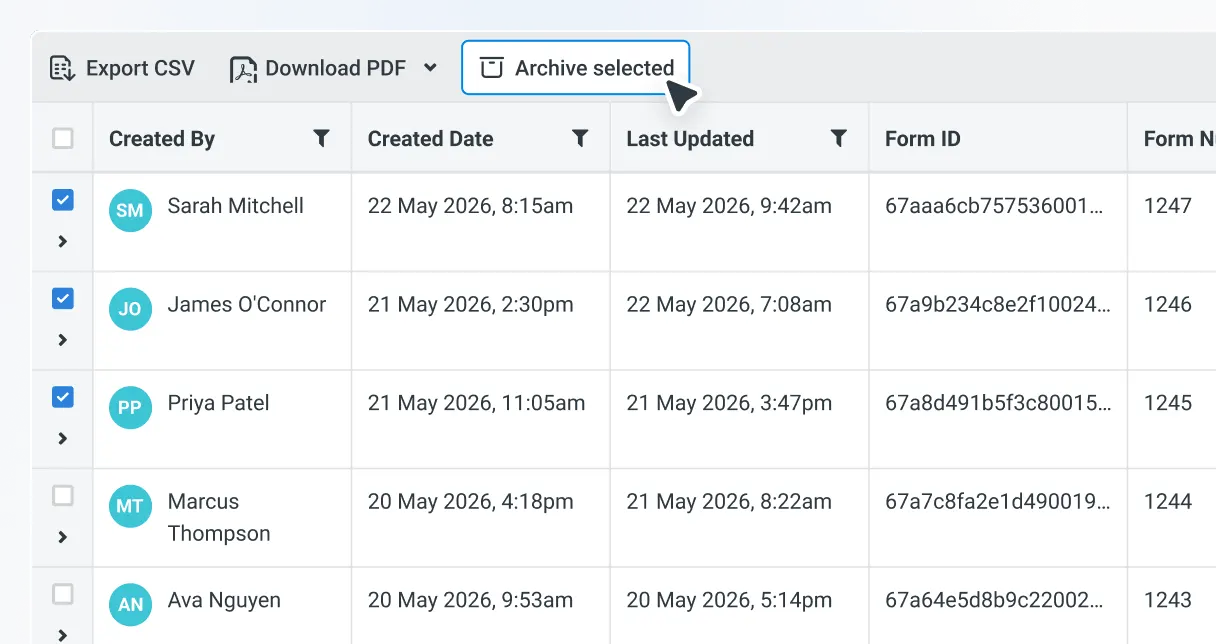
    Archive and restore in bulk. Archived forms drop out of the active register but stay searchable, and can only be deleted with explicit confirmation.

    Lists

    Archive people, plant, and cost-code lists when a project closes. Restore them if the same data is needed again.

    Folders

    Archive completed project folders to clear the active view. Forms and history are preserved, and the folder can be restored if the project reopens.

    Multi-workspace governance

    Govern every workspace from one place

    Big companies don't run on one workspace. They run on dozens, and every one rebuilds the same templates and lists. Sitemate Start is the free account layer above them all. Build once, every workspace stays in sync.

    Cross-workspace Users

    One searchable view of every user across every workspace. Answer "who has access where" in seconds.

    Account Templates

    Build once at the account layer. Workspaces pull a read-only copy. Master edits propagate everywhere.

    Account Lists

    Master lists for projects, suppliers, equipment, and cost codes. Maintained centrally, kept in sync everywhere.

    Storm uses governed reference data

    Storm draws projects, suppliers, and assets from your account lists instead of free-typing them, so the same name means the same thing in every workspace.

    Data, Residency & Reliability

    Hosted in your region. Encrypted by default

    AES256 Encryption at rest
    TLS 1.2+ Encryption in transit
    99.99% Monthly uptime SLA
    AWS Region of your choice

    Integration

    Plug Sitemate into the systems your business already runs on

    Enterprise environments are never single-vendor. Sitemate exchanges data cleanly with the rest of your stack so records, approvals, and analytics flow into the tools your business already uses.

    Flowsite, no-code automation

    Hundreds of system connectors and a no-code builder for moving records, approvals, and events between Sitemate and the rest of your business. Used by enterprise teams to push timesheets to ERP, sync defect data with project management tools, and feed Power BI dashboards.

    Open API

    Programmatic access to records, lists, and workflows for custom integrations into ERP, accounting, BI, and data warehouses. For when no-code is not enough and your engineering team needs to own the pipeline.

    Sitemate MCP

    Connect AI tools and agents directly to your Dashpivot data through Model Context Protocol. Lets your team query structured Sitemate records from the LLMs they already use, without separate data pipelines.

    Enterprise Support & Onboarding

    A team alongside yours, not a ticket queue

    Enterprise plans include the people, process, and tooling to land Sitemate cleanly across your business. A typical rollout runs in four stages.

    Plan

    A named rollout team scopes the deployment across business units, regions, and shifts.

    Configure

    Existing forms, ITPs, SWMS, and reports rebuilt as smart digital templates, or generated from scratch using Storm.

    Review

    SOC-2 report, security questionnaires, DPAs, and policy documentation provided to your IT and compliance teams.

    Train

    Admin, supervisor, and frontline sessions, in person or virtual, across regions and shifts.

    Common questions from enterprise teams

    Scope & coverageWhat does Sitemate Enterprise cover?

    Sitemate Enterprise is the front line AI solution for enterprise built world companies. It covers the full Sitemate stack (Dashpivot, Gearbelt, Sitemate Mobile App, Flowsite, Storm, Sitemate MCP) configured for enterprise governance, scale, and compliance. Workflow management, AI-powered record completion, asset management, and integration into existing back-office systems, all governed at the account level.

    Scope & coverageHow is Sitemate Enterprise different from standard Dashpivot or Gearbelt?

    Enterprise is the same product surface, configured for the controls and infrastructure enterprise operations require. The differences are in governance: account-level template and list management through Sitemate Start, workspace and field-level controls over how Storm deploys, model selection per workflow, full audit trails, SSO, advanced permissions, and dedicated Customer Success support.

    AI & human controlHow does Storm work at enterprise scale?

    Storm operates inside Dashpivot, governed by enterprise controls. Workspaces, templates, and individual fields all carry granular permissions for what Storm can and cannot write. Admins choose which LLM backs which context. Every Storm action is logged with a traceable owner, every output is a draft until a human signs off, and the agent never operates outside the scope governance teams define.

    AI & human controlWhat governance controls does Storm offer for enterprise deployment?

    Storm can be enabled feature by feature, workflow by workflow. Process-level configuration controls whether AI Templates and Form Fill are available in each workspace. Template-level controls govern which forms Storm can act on. Field-level controls govern which fields Storm can write to. LLM selection is configurable per context. Every change is recorded in the audit log. AI gets rolled out where it adds value, blocked where it does not, and reviewed at every step.

    Compliance & standardsDoes Sitemate meet standards like ISO 45001, ISO 9001, and SOC-2?

    Sitemate's workflows support records that meet ISO 45001 (safety), ISO 9001 (quality), and other built world compliance standards. Audit checklists for these standards can be generated as templates, with findings logged and exportable as audit-ready PDFs. For platform certifications such as SOC-2, contact Sitemate's Customer Success team for the latest documentation.

    Compliance & standardsHow does Sitemate handle audit trails and traceability for AI-assisted records?

    Every record carries a full trail from input to committed output. For AI-assisted records, the trail includes the inputs Storm received (voice, photo, text), the fields it wrote, the LLM that was used, and the human who reviewed and signed off. Every change is timestamped and linked to a named user. Records are defensible under audit, even when Storm contributed to drafting them.

    Compliance & standardsIs Sitemate SOC-2 certified?

    Yes. Sitemate is SOC-2 Type 2 certified. All policies and procedures are designed around adhering to the SOC-2 trust service principles. The SOC-2 Type 2 report, security questionnaires, and DPAs are available on request, under NDA.

    Compliance & standardsIs Sitemate GDPR compliant?

    Yes. Sitemate is designed to comply with applicable data protection regulations including GDPR (EU and UK) and the Australian Privacy Act 1988. Data Processing Agreements are available on request, and Sitemate maintains a Third Party Data Processor register that includes all AI sub-processors. Read the full Sitemate Privacy Policy.

    Compliance & standardsWhat is the uptime SLA?

    Sitemate operates to a 99.99% monthly uptime SLA on available minutes. Services run on managed PaaS infrastructure with live failover replicas. Snapshot backups are taken daily (stored for 7 days) and weekly (stored for 4 weeks). DR and BCP procedures are tested regularly. RPO is one hour maximum (most services 15 minutes); RTO is eight hours maximum.

    Multi-site & scaleHow does Sitemate handle multi-site, multi-region operations?

    Workspaces, projects, and folders group data by site, region, division, or any structure the company uses. Permissions and visibility are configurable at each level. The same templates, registers, workflows, and dashboards can run in Perth, Houston, and Manchester with the same structure and sign-off discipline, while regional variants (SWMS, RAMS, JHA) are supported through template configuration.

    Multi-site & scaleCan different regions or divisions have different requirements?

    Yes. Templates support regional variants and language differences. Storm operates in the language workers use, with the form record produced in the workspace's working language. Workspace-level configuration means each region or division can run its own variant of a workflow while sharing the same underlying platform and governance model.

    Security & dataWhere does our data live, and can we choose the region?

    Sitemate hosts data in regional AWS infrastructure. Today: Asia Pacific in Sydney (ap-southeast-2) and Europe in London (eu-west-2), each spanning three Availability Zones. Customers can choose their hosting region. Sitemate uses Platform-as-a-Service (PaaS) services for enhanced security and compliance posture.

    Security & dataHow is customer data encrypted?

    All data is encrypted at rest using AES256-CBC and in transit using TLS 1.2 or above. Photos and videos are stored in Amazon S3 across at least three devices in a single AWS region.

    Security & dataWhich Single Sign-On providers are supported?

    Sitemate SSO supports the industry-standard SAML 2.0 and OpenID Connect (OIDC) protocols. Any identity provider supporting these protocols can be configured, including Microsoft Entra ID (Azure AD) and Okta. SSO is mapped to your email domains for Contributor users (managers, supervisors, administrators).

    Security & dataAre Contributors required to sign in with SSO?

    Yes. Users whose email domain is mapped to your SSO configuration are auto-redirected to your identity provider on every login and authenticate following your company's requirements. They cannot use social sign-in, magic link, or password to bypass SSO.

    Security & dataWhat about partners, subcontractors, and other external users?

    External users are set up as Visitors. Visitors are not covered by your SSO configuration, so they can sign in with social (Google or Microsoft), email magic link, or password, whichever is easiest for them. This is deliberate so you don't have to provision SSO accounts for every contractor on site. Visitor permissions are restricted by default and can only access the folders and forms you choose to share.

    Security & dataIs multi-factor authentication supported?

    Yes. MFA is enforced through your authentication provider. Sitemate routes the authentication request to your IdP, where your MFA policies are applied.

    Security & dataHow do we manage user access at scale?

    User management supports search, sort, and bulk actions. Role-Based Access Control (RBAC) applies across workspaces, folders, templates, and fields. Users removed from Sitemate are auto-logged out of the mobile app, and every access change is logged in the audit trail.

    Security & dataWhere can we get the full security documentation?

    The SOC-2 Type 2 report, security questionnaires, DPAs, and supporting policy documentation are available on request from Sitemate, under NDA.

    Pricing & licensingHow is Sitemate Enterprise priced?

    Sitemate Enterprise is priced through a custom commercial arrangement based on the products in scope (Dashpivot, Gearbelt, Flowsite, Storm) and the number of users, assets, and connectors required. Volume pricing applies at enterprise scale. Storm is available across all Dashpivot plans, including Enterprise, with fair-use guidance for very high-volume environments.

    Pricing & licensingWhat is included in the Enterprise tier that is not in standard plans?

    Account-level list and template data management through Sitemate Start, advanced workspace and field-level Storm controls, dedicated Customer Success support, advanced permissions including SSO, and custom commercial terms. Specific inclusions vary by deal scope.

    Integration & APIHow does Sitemate connect to our existing enterprise systems?

    Flowsite connects Sitemate to enterprise systems through no-code connectors (Xero, QuickBooks, Microsoft Power Platform, Power BI, Excel, SharePoint, and more). The Sitemate API supports custom integrations for systems Flowsite does not yet cover. Sitemate MCP exposes Sitemate data to enterprise AI tools (ChatGPT, Claude, Microsoft Copilot) for read-only natural-language query.

    ImplementationWhat does a Sitemate enterprise rollout look like?

    Enterprise rollouts are staged with Customer Success support. Typical phases: confirm governance posture (workspace structure, permissions, Storm scope), import or build templates for in-scope workflows, configure Flowsite connectors to back-office systems, run a controlled pilot in one site or division, then scale to the rest of the company. Most enterprises have their first workflows live within weeks, with full rollouts measured in months for very large estates.

    ConfigurationCan we configure Sitemate for our specific governance requirements?

    Yes. Workspace, template, project, and folder-level permissions are fully configurable. Storm controls operate at the same levels (workspace, template, field, model). Account-level data management through Sitemate Start lets enterprise admins maintain master lists, template libraries, and reference data centrally, with workspaces inheriting from the account. Approval workflows and sign-off chains can be tailored to match internal governance.

    MigrationCan we migrate historical records and existing processes into Sitemate?

    Yes. Templates can be generated by Storm from uploaded PDFs, Word docs, Excel sheets, or photos of paper forms, which preserves existing structures while making them digital. Historical records can be imported via bulk upload or through Flowsite from the source system. Sitemate Customer Success runs migration projects for enterprise customers, scoped to the data volume and complexity involved.
    No FAQs match your search. Try a different keyword or pick another category.












